We’re introducing a new way to handle transcript review inside Scribie: Review with Gemini. It brings AI-assisted checks directly into the Scribie Editor, so you can customize and refine a transcript without ever copying it into an outside tool.
If you have ever pasted a transcript into a third-party chatbot to reformat or adjust it, you already know the trade-off. You gain a way to reshape it, but your file leaves your control. For legal, corporate, and academic work, that is a real problem. Review with Gemini removes that trade-off. Your transcript stays inside Scribie, on files we already handle under our confidentiality terms, and a human always makes the final call.
What is Review with Gemini?
Review with Gemini is a transcript review feature built into the Scribie Editor. It uses Gemini-powered AI to help you customize and refine an already-verified transcript without leaving the platform.
Instead of manually scanning a long file line by line, you can apply AI-assisted formatting and style options:
- Apply strict speaker tracking and attribution
- Enforce verbatim style, or clean up run-on sentences
- Adjust punctuation and formatting for readability
- Capitalize abbreviations and format spelled-out words
- Capture objections and interruptions for legal formatting
Most importantly, it enhances human review rather than replacing it. The AI applies the options you choose; you decide what stays.
Why run transcript review inside Scribie instead of a third-party chatbot?
This is the question that matters most for professional work, so let’s answer it directly.
When you drop a transcript into a public AI chatbot, you lose control of that content. The text may be retained, logged, or used to train a model. For a deposition, a board meeting, or a research interview, that is a confidentiality risk you cannot always undo. Many legal and compliance teams simply prohibit it.
Review with Gemini keeps the entire process in one place. The review runs against a transcript we already hold under our terms, and nothing is copied into an outside account. As a result, you get the benefit of an AI second pass without creating a new data-security exposure. That is the difference between AI as a risk and AI as a safeguard.
Why tailor an already-verified transcript?
Your transcript arrives human-verified, so accuracy is already handled. But different uses need different formatting. A court filing needs strict verbatim and captured interruptions; a published article needs clean, readable prose. Review with Gemini lets you adapt the same verified transcript to each need without redoing the work by hand.
With Review with Gemini, you benefit from:
- Faster formatting. Apply your preferred style across the whole file in one pass.
- Consistency. Enforce the same speaker, punctuation, and formatting rules throughout.
- Flexibility. Reshape a verified transcript for legal, corporate, or media use.
- You stay in control. Review and confirm every change before it’s applied.
That said, the AI never has the last word. It applies the options you choose, and you confirm every change.
How do you use Review with Gemini? (Step-by-step guide)
Here is a detailed walkthrough of how to access and run transcript review inside Scribie.
1. Go to Delivered Files
First, open the Delivered Files page at https://scribie.com/files/delivered. There you will see every completed and delivered transcription file.
2. Open the file menu
Next, on the right-hand side of each file entry, click the dropdown arrow (▼) next to Check & Download. This opens the menu of available actions for that file.
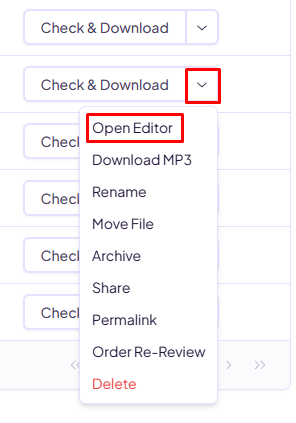
3. Launch the editor
From the dropdown menu, click Open Editor. This opens the transcript in Scribie’s Editor, where you can review and interact with the full file.
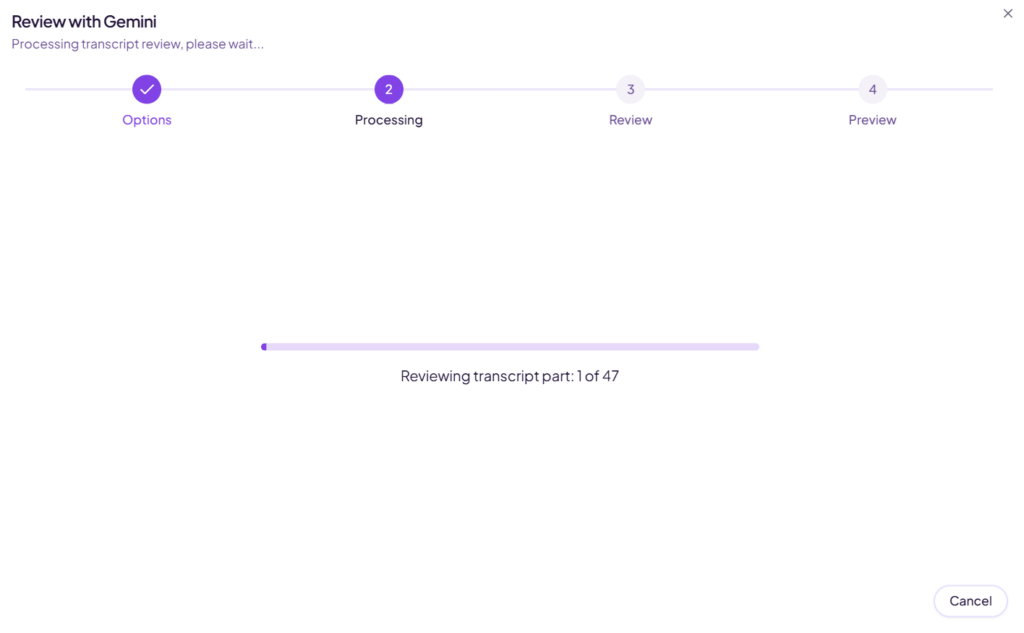
4. Review runs on the full transcript
Review with Gemini processes the entire transcript in sequence, so you don’t need to select anything. For long files, it works through the transcript in parts – you’ll see progress like “Reviewing transcript part 3 of 12.”
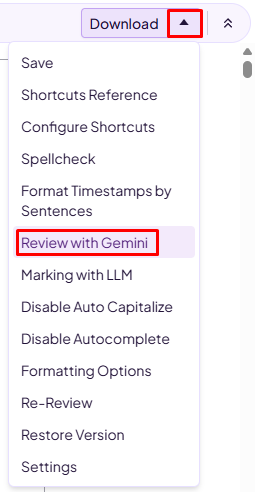
5. Activate Review with Gemini
In the upper-right corner of the Editor, open the dropdown menu and select Review with Gemini.
6. Choose your review options
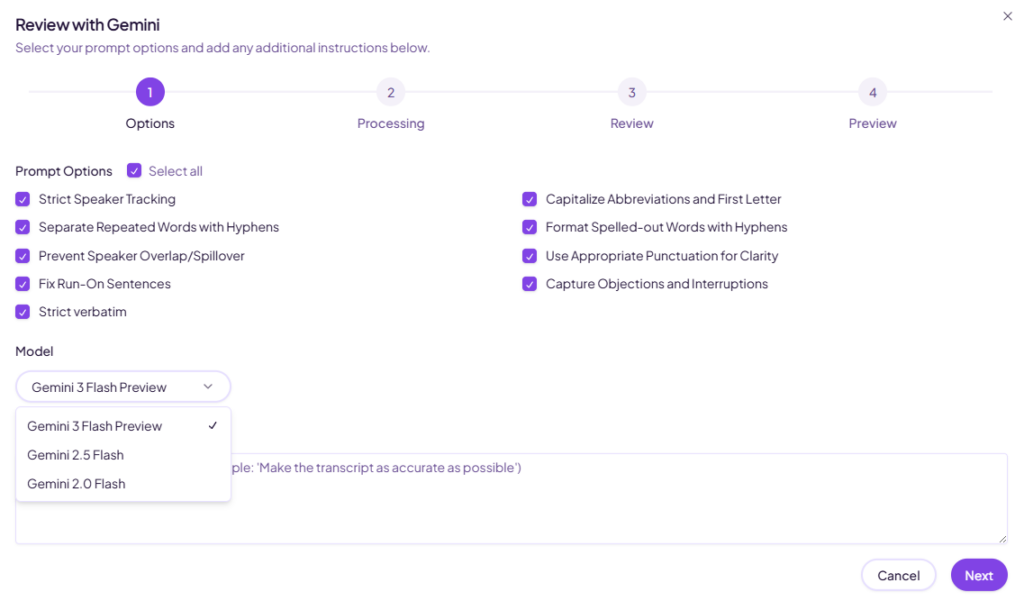
You can then pick the checks that fit your file. Run speaker tracking, formatting, verbatim, and clarity options, among others, or choose Select All to apply every option at once. Additional checks include run-on sentence fixes, punctuation for clarity, and capturing objections and interruptions, so you can tune the review to legal, corporate, or academic formatting needs.
We keep the underlying model current for you, so you never have to track versions or worry about a model being retired.
You can also add your own guidance in the Additional Instructions box below the Model. Use it to give Gemini extra context or specific formatting requests – for example, a preferred spelling convention, how to label speakers, or a house style to follow and it will apply that alongside the options you selected.
7. Wait for the review to finish
Once you confirm, the system processes the transcript, the AI analyzes your selected sections, and results appear as suggested insights and results appear as suggested edits for you to review. Processing time varies with file length.
8. Review and apply the suggestions
Finally, go through the highlighted suggestions, validate each change where needed, and apply your edits directly in the Editor. You remain fully in control of the final output.
Who is transcript review with Gemini built for?
Review with Gemini fits any workflow where the same verified transcript needs to meet different formatting standards, including:
- Legal transcription and depositions
- Corporate meetings and reports
- Academic research documentation
- Media captions and subtitles
- High-volume transcription operations
In each case, it improves consistency while cutting the manual effort a full review normally demands.
Part of Scribie’s ongoing innovation
Scribie continues to evolve the platform by combining human expertise with intelligent tools that improve speed, accuracy, and usability. Review with Gemini fits that direction. It helps you work more efficiently while holding to the high transcription standards your work requires.
Why Scribie?
Scribie is built on a human-in-the-loop model, and Review with Gemini reflects that principle exactly. Every transcript is human-verified before it reaches you — our transcribers are trained in legal terminology and court formatting, and we stand behind a 99%+ accuracy guarantee on human-verified transcripts. Because that verification is already done, Review with Gemini is a convenience layer on top of the guarantee — a way to tailor a verified transcript, never a substitute for the human check. And because the review runs inside the platform, your files stay private throughout.
If your team handles sensitive or high-stakes transcripts, we would be glad to walk you through how our human-verified transcription services fit your workflow. Get in touch with our team to learn more.
Review with Gemini is available now in the Scribie Editor, on the Delivered Files page.
Leave a Reply